WJI: Wojak Index Command
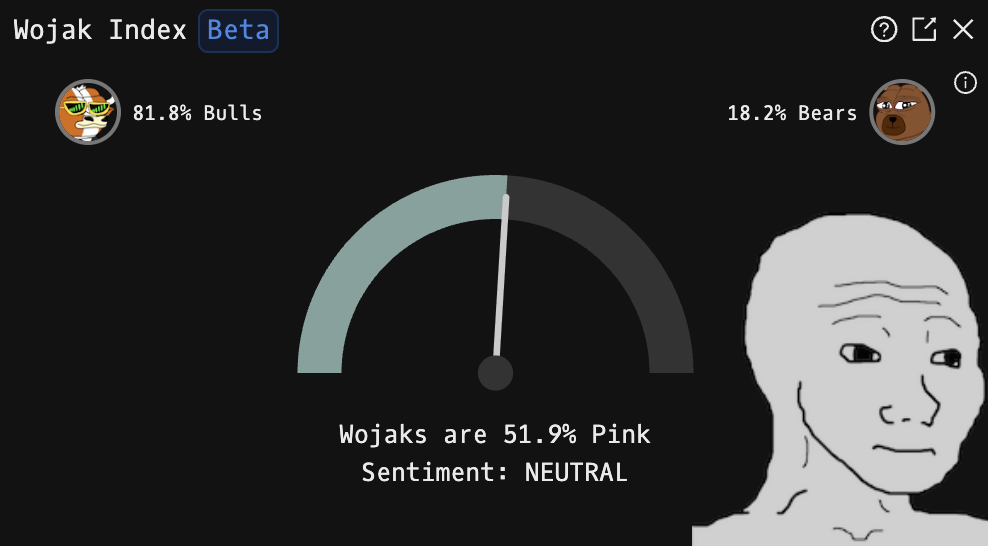
WJI is the Godel Terminal command for viewing the live Wojak Index: a real-time sentiment gauge built from Pink/Green wojak emoji usage in Godel's #general chat.
How to use WJI
Command:
WJI

Display Components
- Gauge: A semicircular meter showing current sentiment. The needle moves from left (green/bullish) to right (pink/bearish), and the arc color follows the current reading.
- Bull/Bear Ratio: Percentage split between bullish and bearish emotes at the top of the component.

- Wojak: Image state that changes based on the current sentiment level.
Info Panel
Click the info icon (ⓘ) in the top-right corner to toggle detailed emote counts.
Sentiment Levels
The Wojak image changes with the live Green/Pink split. Scroll through the states below from strongly bullish to strongly bearish.
MANIA>90% Green
ECSTATIC>80% Green
EXCITED>70% Green
OPTIMISTIC>60% Green
NEUTRAL40-60%
WORRIED>60% Pink
PANIC>70% Pink
SUICIDAL>80% Pink
ARMAGEDDON>90% Pink
ANNIHILATION>95% Pink
FAQ
What does WJI do?
WJI is the Godel Terminal wojak index command.
How do I open WJI in Godel Terminal?
Type WJI in the terminal, or prefix with a ticker (for example, NVDA US EQ WJI).
Is WJI available on all plans?
Yes, WJI is available on every Godel plan.