WEIF: World Equity Index Futures Command
WEIF is the Godel Terminal command for monitoring futures prices on the world's major equity indices.
How to use WEIF
Command:
WEIF

The WEIF window lists index futures grouped by region, with live price, change, year-to-date performance, and delay status for each contract:
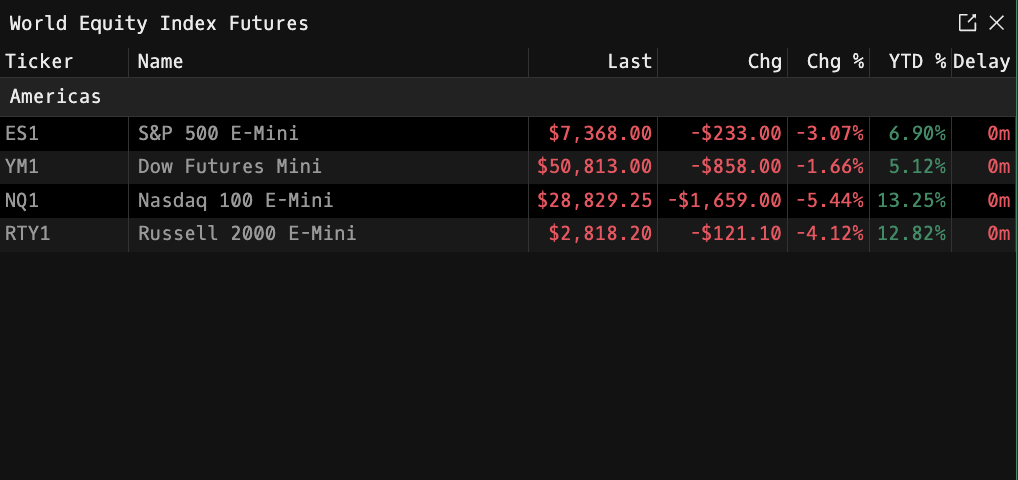
Display Columns
| Column | Description |
|---|---|
| Name | Index futures contract name |
| Value | Last traded price |
| Chg | Absolute change vs. previous close |
| Chg % | Percentage change vs. previous close |
| YTD % | Year-to-date performance |
| Delay | D if the quote is delayed; blank if real-time |
Regions
Contracts are grouped by region. Currently shown: Americas. (Additional regions such as EMEA and Asia/Pacific may be enabled over time.)
Navigation
Click any ticker to open its default view (chart by default). The click-through behavior can be customized in settings via PDF.
Flash on Update
Rows briefly flash the primary theme color whenever the underlying quote updates, so you can catch movement at a glance.
Entitlements
WEIF requires a paid Godel account. Free (piker) users are blocked from opening the window.
FAQ
What does WEIF do?
WEIF is the Godel Terminal world equity index futures command.
How do I open WEIF in Godel Terminal?
Type WEIF in the terminal.
Is WEIF available on all plans?
WEIF requires a paid Godel plan. Free (piker) accounts can't open the WEIF window.
Does WEIF work for ETFs, indices, or non-US securities?
WEIF is built specifically for equity index futures, not individual stocks or ETFs. It covers the world's major index futures contracts (currently the Americas, with additional regions enabled over time).